My experience on my daily works... helping others ease each other

Showing posts with label Technology. Show all posts

Wednesday, November 8, 2023

🚨 A Wake-Up Call for Pattern Approval in the Age of Automation

Recent news on the unfortunate incident involving a South Korean man and an industrial robot serves as a stark reminder of the importance of stringent controls and assessments for robotics and AI systems. It's not the first case, and the implications are clear—it's high time we prioritize the thorough evaluation of algorithms and safety measures to prevent potential disasters. The last thing we need is our technological advancements turning into a real-life Terminator scenario or a page out of The Matrix.


💡 Ensuring Safety in the Age of AI


As we accelerate into an era dominated by automation, the necessity of validating artificial intelligence and robots before their integration into real-world scenarios becomes increasingly apparent. The risks associated with overlooking this crucial step are far-reaching, impacting not only individuals but also the trust we place in these transformative technologies. It's not just a matter of compliance; it's about safeguarding lives and instilling confidence in the capabilities of the AI and robotic systems we deploy.


🌐✨ Empowering a Secure Tomorrow with SIRIM's Assurance


In our dynamic world embracing the swift rise of automation, SIRIM, leveraging the expertise of NMIM, assumes a central role in sculpting a future where innovation harmonizes effortlessly with safety. As we lament recent unfortunate incidents, it is incumbent upon us to collectively advocate for responsible and secure technological advancements. SIRIM stands at the forefront, equipped to deliver crucial evaluations and verifications. Through SIRIM's pattern approval certifications, we meticulously inspect, test, and validate both hardware and software algorithms. Our commitment is to ensure that these technologies are not only cutting-edge but also safe, reliable, and robust, adhering strictly to the ethical standards of AI. Together, let's pave the way for a future where robots and AI enrich our lives without compromising on safety.


#ai #artificialintelligence #patternapproval #sirim #nmim #aimalaysia #sirimdigitalfactory #TechSafetyLeadership #InnovationWithIntegrity 🚀🔐
S. Korean man killed by robot

Share:

Sunday, April 26, 2020

Improving your Telegram Security


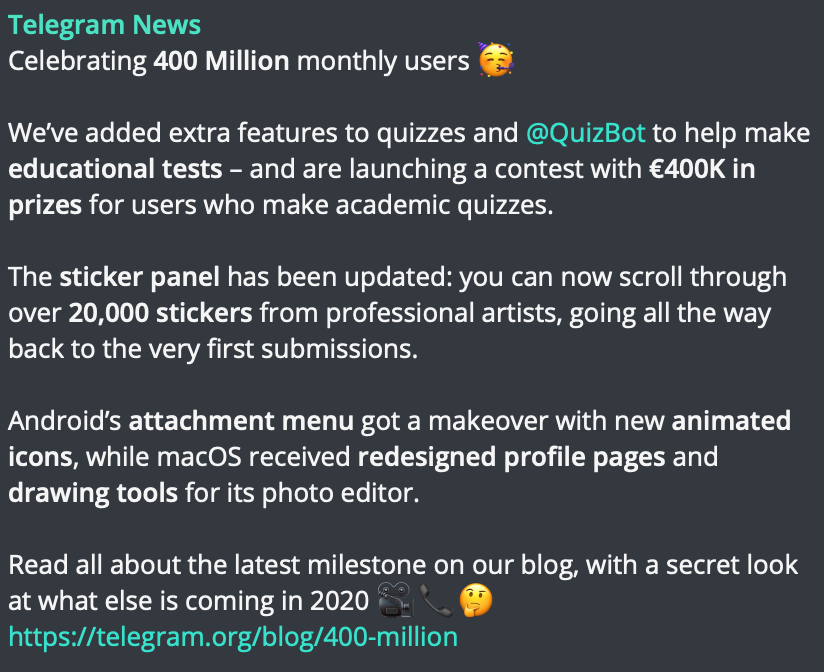
Telegram’s user continues to increase and recently it reaches 400 million user per month
Since its birth, there are many features added plus friendly API allowing various innovative ideas add-in to its base. 


But, having lots of features may also result in lots of possibilities for hacking. One of the many features that may be wrongly used is the Automatic Media Download. 

As noob @ beginner, many do not realize it until their phone or PC slow due to disk space has shrunk as telegram keeps on automatically download all files. 

The most scarier is that the auto-play anything including GIF, video, and audio. All this can be used by hackers to insert a code and inject it upon executed/run by telegram.

However, luckily telegram allow us to modify the setting. Here are the steps to change it:
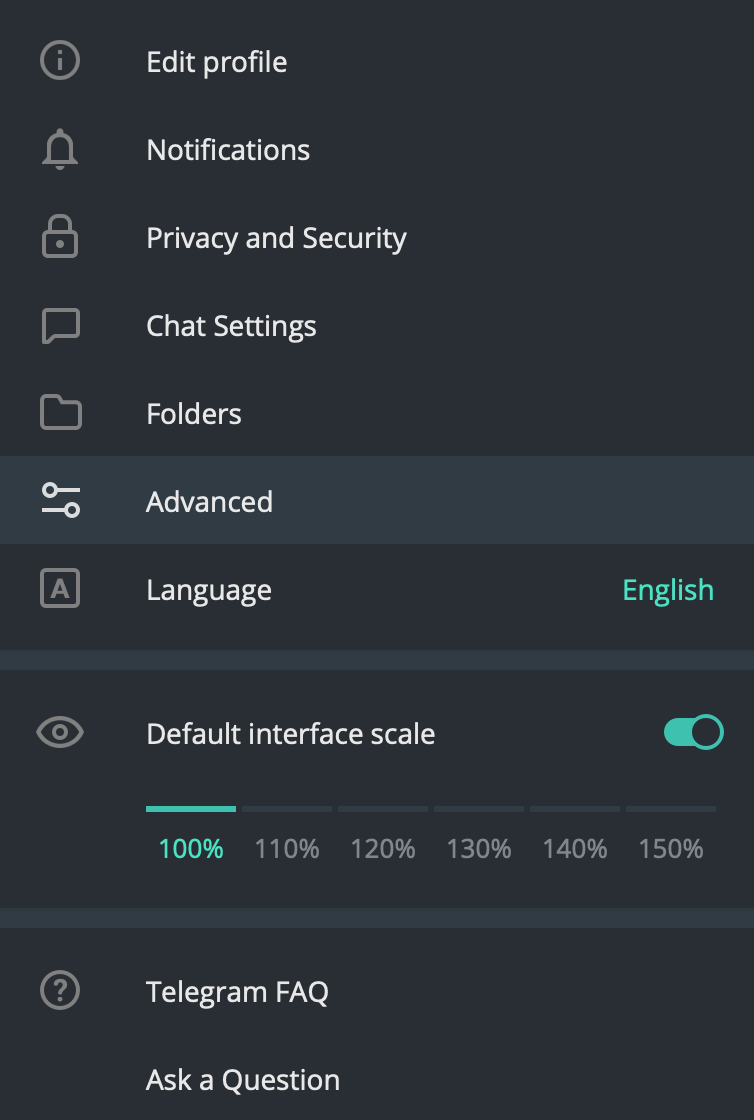
  1. Go to your telegram setting and choose Advance
Telegram setting window
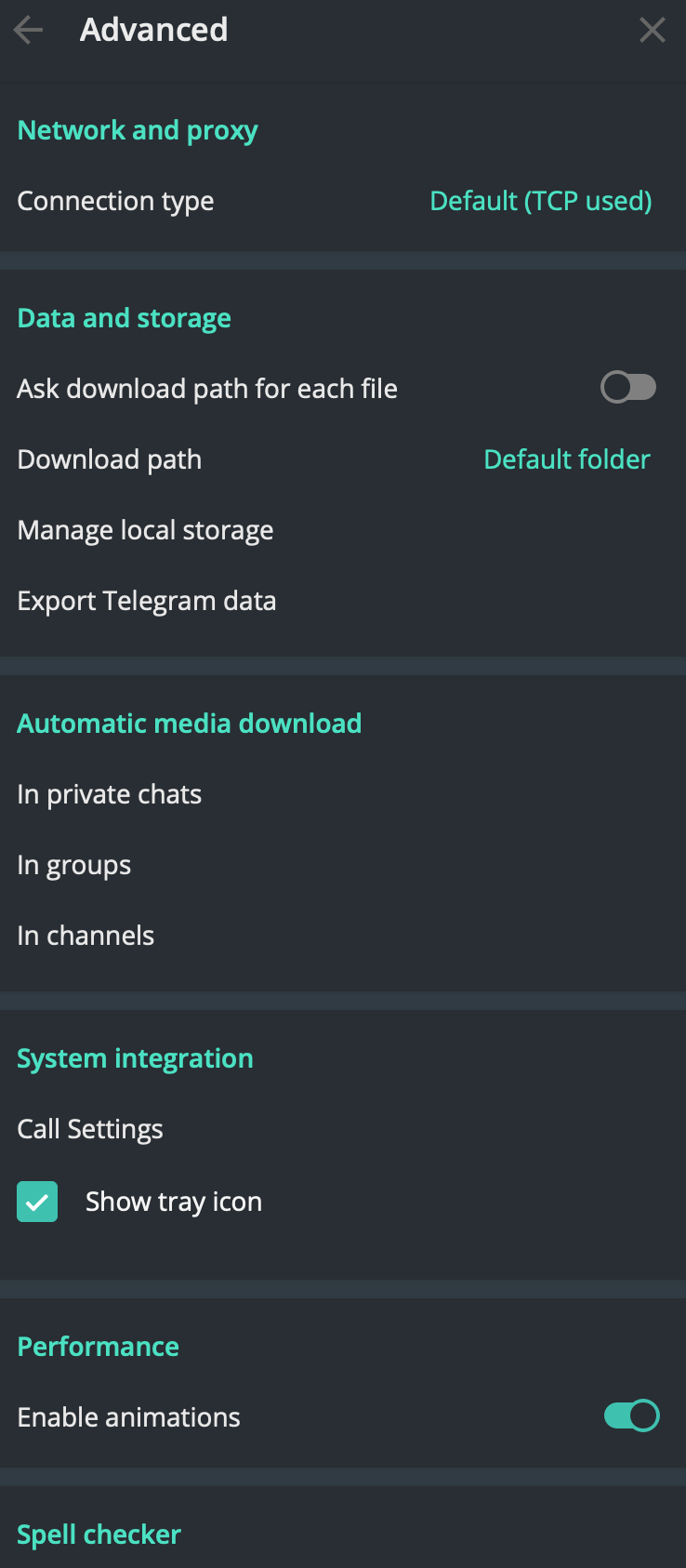
2. At the Advance screen, go to Automatic media download section
In the Advance setting
3. Click In private chats
In automatic media download setting
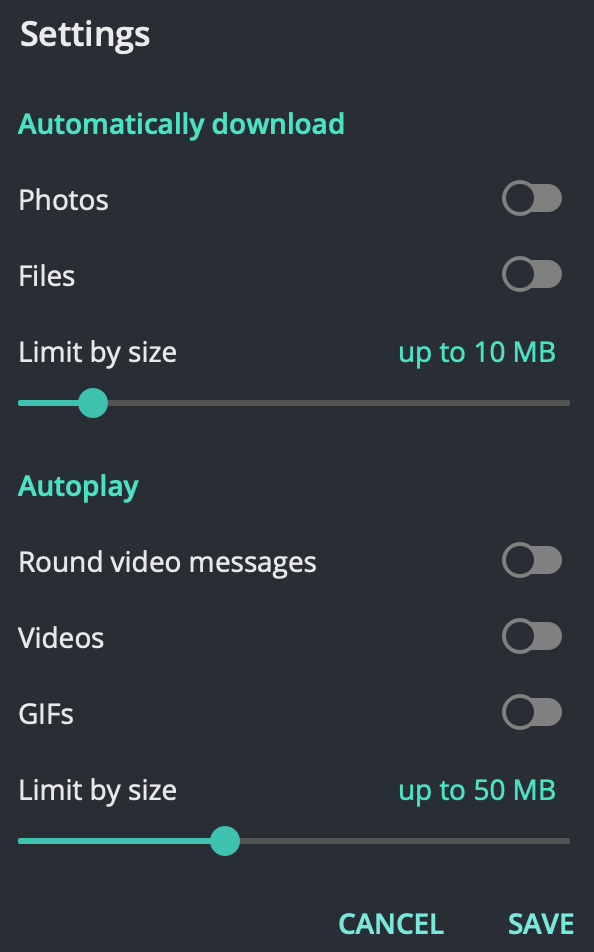
4. In the setting, click all the slide-tick to disable it (or you can choose whichever you want to enable or disable). You can even reduce the size to increase the protection rate.

5. Continue the process for all settings within the Automatic media download section.


That’s all.. you are ready to go and you shall be safe.
Share:

Sunday, October 21, 2018

Lesson learn on R conference (ConfeRence 2018, ADAX Malaysia)

I attended R conferences organized @ ADAX Malaysia (ConfeRence) on October 20, 2018, recently. I do have an interest in AI, ML and Semantics Analysis. It started since 2008 when I further studies focusing on program analysis, specialized on static analysis on C overflow vulnerabilities.

There are key points which I would like to share based on the knowledge shared by local experts.

Ensemble Method

I'm quite new and just heard about this. The presenter shared that there are many methods but common are Bagging, Boosting and Stacking

Bagging


  1. Can produce a Discrete or Continuous Result
  2. Discrete (Classifications) - voting
  3. Continuous - regression -> mean
  4. Basically, the data is put into multiple "bags" in a random selection and you train the using one or various model. Finally, you find the mean of the result and produce the outcome from it.
For more understanding, check the video below


Boosting


  1. From the result, you will get a significant error and continue the training process on the data until you have no error on the latest bag or based on a defined number of the model required.
  2. 2 famous algorithm applied - GBM (Gradient Boosting Machine) & XGBoost - eXtreme Gradient Boosting Algorithm

To understand it, just check out the video below


Stacking (aka Ensemble Learners)


  1. In Stacking, you still use various model and numbers of bags.
  2. However, in stacking, you will use different algorithms such as KNN, LinReg, Decision Tree, SVM
  3. The result of the training on each bag which applied different algorithm will be added together to find the mean of it.


Other methods are also applicable such as Random Forest.

Ensemble method in R -> You can use SuperLearner Package library in R Studio

There are issues with ensemble which the data might be highly accurate when it is trained in development. But when you applied in the actual world, the data may produce a different result. To avoid this (inaccuracy or over-fitting problem), you will need to implement elastic net on all model. 2 known algorithms in elastic net are ridge and lasso.

Text Clustering with R


  1. Clustering in R can be calculated by using the algorithm like K-Means, KNN, Hierarchical Clustering, and DBScan.
  2. For Text Clustering, you need to measure the distance to enable you to cluster the text. For instance, what is the distance between the word 'wheel' and 'tire'. 
  3. Distance normally is measured using an algorithms known as Euclidean D
  4. For text clustering, there is a library that can be utilized to measure the distance; Wu-palmer developed by. However, the library only available for Python and not for R yet (as of the information shared on Oct 20, 2018)
  5. Available language lexical which can be used to measure distance using the algorithm is WordNet (https://wordnet.princeton.edu/)

Churn Prediction using SNA - Social Network Analysis

2 Library available and shall be used - igraph and R Markdown
Challenges in predicting - how to minimize loss due to algorithm implemented.

Some references:


  1. https://en.wikipedia.org/wiki/Ensemble_learning
  2. https://en.wikipedia.org/wiki/Cluster_analysis
  3. WordNet English (Lexical English Language) https://wordnet.princeton.edu/
  4. WordNet Bahasa Melayu (Lexical Malay Language) - http://wn-msa.sourceforge.net/index.eng.html
  5. https://en.wikipedia.org/wiki/Semantic_analysis_(linguistics)
  6. https://en.wikipedia.org/wiki/Latent_semantic_analysis
  7. https://blog.thedigitalgroup.com/words-similarityrelatedness-using-wupalmer-algorithm
  8. https://en.wikipedia.org/wiki/Euclidean_distance
  9. https://www.researchgate.net/publication/310572659_A_modification_of_Wu_and_Palmer_Semantic_Similarity_Measure


Thanks to the team who share their knowledge. Check it out them at https://www.facebook.com/groups/MalaysiaRUserGroup/

Share:

Wednesday, September 26, 2018

Managing multiple JDK in Mac OS

In MAC (Apple), it is a bit difficult to manage multiple Java Environment & JDK. If it is in windows, you may just change the home directory (JAVA_HOME) declaration in your system path. However, for Mac, you need to perform many steps and luckily there is a tool to help you out.

Check out the tool Jenv at http://www.jenv.be/ and steps is written here too.
Share:

Sunday, December 31, 2017

Javascript to newbies

Want to learn JavaScript and conquer the world? Start here:

Tutorials and Books
- JavaScript For Cats is a dead simply introduction for new programmers.
- MDN JavaScript Guide has the most standard and straightforward tutorials. If you need references, MDN is here for you
too.
- You Don’t Know JS is the best book to learn JavaScript from. It’s free to read on GitHub.
- Eloquent JavaScript is another great introduction to programming and learning JavaScript.
- Modern JavaScript Cheatsheet helps you understand and learn all the new features in the language.
- JSBooks, a collection of free JavaScript books.

Videos and Courses
- JavaScript: Understanding the Weird Parts an incredible course which teaches the concepts of the language. First 3 hours
are free on YouTube, you can but the whole course from Udemy.
- FunFunFunction makes the learning process enjoyable.
- Javascript30, 30 videos to level up your skills.
- Traversy Media great contents mostly aimed for begginers.

Learn by Doing
- FreeCodeCamp, learn to code by building projects.
- CodeAcademy, learn to code interactively.
- Codewars, train with programming challenges.

Functional Programming
This where the true the good parts show theirselves.
- JSUnconf 2016, learn functional programming basics with this talk from Anjana Vakil.
- FunFunFunction's videos are a great start.
- Mostly Adequate Guide to Functional Programming and Functional Light JS will make you master the functional programming.
- JavaScript Allongé, programming from functions to classes.
- Functional Programming Jargon in simple terms.
- awesome-fp-js is a good reference for functional programming in JavaScript.

Other Resources
- Spellbook of Modern Web Dev is a big picture of modern JavaScript development.
- What the fuck JavaScript?, list of funny and tricky JavaScript examples.

From JS telegram Part of @thedevs 
Rules: @thedevsrules Join other dev groups https://thedevs.network
Share:

Thursday, March 2, 2017

Get start with ionic framework

When I first developed apps using ionic, not many resources over the net will provide good explanation on it. I've found one and it is very easy to understand.

Here is the structure of ionic framework after it successfully execute ionic start command; for example 

ionic start myfirst blank --v2

>> ionic start [your_apps_name] [template] [ionic_framework_version]

the command will create a new folder (myfirst) and construct the following structures

├── hooks // custom cordova hooks to execute on specific commands 
├── platforms // iOS/Android specific builds will reside here 
├── plugins // where your cordova/ionic plugins will be installed 
├── resources // icon and splash screen 
├── scss // scss code, which will output to www/css/
 |── www // application - JS code and libs, CSS, images, etc. 
      |---------css //customs styles 
      |---------img //app images 
      |---------js //angular app and custom JS 
      |---------lib //third party libraries 
      |---------index.html //app master page 
├── bower.json // bower dependencies 
├── config.xml // cordova configuration 
├── gulpfile.js // gulp tasks 
├── ionic.project // ionic configuration 
├── package.json // node dependencies


Following are current potential templates that you can use:
  • tabs : a simple 3 tab layout
  • sidemenua layout with a swipable menu on the side
  • blanka bare starter with a single page
  • superstarter project with over 14 ready to use page designs
  • tutoriala guided starter project

Once it is completed, you will get to see the following message appear:
Downloading: https://github.com/driftyco/ionic2-app-base/archive/master.zip
Downloading: https://github.com/driftyco/ionic2-starter-                   sidemenu/archive/master.zip                                                
Installing npm packages (may take a minute or two)...                      
-                                                                          
♬ ♫ ♬ ♫  Your Ionic app is ready to go! ♬ ♫ ♬ ♫                          
                                                                           
Some helpful tips:                                                         
                                                                           
Run your app in the browser (great for initial development):               
  ionic serve                                                              
                                                                           
Run on a device or simulator:                                              
  ionic run ios[android,browser]                                           
                                                                           
Share your app with testers, and test on device easily with the Ionic View companion app:                                                             
  http://view.ionic.io                                                     

Yeah... now you test your apps. Just run ionic serve to view on your browser. It will pop-up your browser and automatically navigate to http://localhost:8100 ... else, you can open your browser and go to the address.

If you want to view in mobile, you may use mobile emulator or deploy on your mobile. Before that, do install mobile platform package first. To do that, run the following command:

                                                                       
ionic platform add ios  // to add ios platform into the package      
                                                                     
ionic platform add android //to add android platform into the package  
                                                                       

Finally, you are ready to run (on emulator or actual device).


ionic run android --prod --release //to run on emulator as production mode 
                                                                           
ionic build android --prod --release //to build as package for installation
                                                                           

For ios, it will require more steps and you can follow it https://ionicframework.com/docs/v2/intro/deploying/.

Lets dance... :)
Share:

Wednesday, November 23, 2016

Running SQL Server on Linux

It has gone viral and loved by many after Microsoft declared their engagement with Linux after series of interaction... and much awaited of the possible potential running few Microsoft product running on Linux.

While waiting, lets give a try on SQL Server running on Fedora through virtual machine powered by Docker

Paul W. Frields and Langdon White share their views and step for this.
  1. https://fedoramagazine.org/run-sql-server-v-next-public-preview-fedora/
  2. https://fedoramagazine.org/sql-server-fedora-docker-container/
Share:

Thursday, December 4, 2014

Network Topology - Leaf-Spine architecture

Leaf-spine is a network topology in which a series of switches form the access layer.
Leaf-spine is an alternate to the three-layer core/aggregation/access network architecture. The leaf switches mesh into the spine, which is a series of several high-throughput layer 3 switches with high port density. Spine switches are essentially the core of the architecture, whereas leaf switches are the access layer that delivers network connection points for servers. Leaf switches also provide uplinks to spine switches.
Every leaf switch connects to every switch in the network fabric; no matter which leaf switch a server is connected to, it has to cross the same number of devices every time it connects to another server. The only exception is when the other server is on the same leaf. Latency is therefore minimized to an acceptable level because each payload only has to travel to a spine switch and another leaf switch to reach its endpoint.
A leaf-spine topology can be layer 2 or layer 3 -- the links between the leaf and spine layer can be switched or routed. In a layer 2 leaf-spine design, Transparent Interconnection of Lots of Links or shortest path bridging takes the place of spanning-tree. All hosts are linked to the fabric and offer a loop-free route to their Ethernet MAC address through a shortest-path-first computation. In a layer 3 design, each link is routed, and it is most efficient when virtual local area networks are sequestered to individual leaf switches or when a network overlay, like VXLAN, is working.

Diagram: Leaf-spine topology


Taken from: TechTarget
Share:

Saturday, October 5, 2013

Glorious Future of BlackBerry Z10

The BlackBerry Z10 is supposed to be the start of a new era for BlackBerry. If that is to happen, consumers will need to be convinced of its innovation and potential. Therefore, they will need to know two things: how does it differ from previous BlackBerry models? And, why should they be interested? BlackBerry will be hoping that the answer to the first question will also answer the second.

Z10 versus early Blackberry

In terms of differences to previous BlackBerry models the Z10 has many. The most notable of these is the absence of the quintessential qwerty keyboard with the 4.2 inch, high resolution touch screen of the Z10 leaving no room for it. This may please those who prefer a touch screen keyboard but may also put off the hardcore faithful who enjoyed the old keyboards. However, for both parties, BlackBerry has designed a spacious and easy to use touch screen keyboard with a predictive text feature which means the predicted word appears over the next letter, meaning the user only needs to swipe it upwards to enter.

Price does matters

Alongside previous model differences, you also need to consider how it fares against the main rivals. Often cheaper than competitors, the BlackBerry Z10 price comes in at RM 1,799.00 for the handset.

Superb Features of Z10

Another new feature on the Z10 is the BlackBerry Hub, which houses all messages, e-mails and notifications. It has been designed with the object of allowing an experience which is flowing and easy for the user. The user may be in the middle of something on an app when their phone beeps but there is no need to close that app and search through texts, social media and e-mail to discover the source of the notification. All they need do is swipe upwards and right with their thumb and peek into the hub, this will allow them to see their texts, e-mails and anything else they have told the Hub to store. From there they can choose whether to reply immediately or later allowing them to not be completely disturbed by every single notification.

In pursuit of further flow there is no need to close apps if the user chooses to reply to the message. The user just has to simply swipe the app down where it will stay exactly as they left it ready to be picked up later when the user is ready. It is important to note that with the Z10s ability to run eight apps simultaneously, there is no need to worry about lag when doing this.

Not everything is totally new on the Z10, some of it has just been updated and modernised such as the new BlackBerry Messenger (BBM). This has always been popular with BlackBerry users as it allows you to exchange messages and pictures instantly with your contact list for free. BBM has been expanded, with the Z10s front facing camera in mind, to allow video calls to any contact anywhere in the world thus making it perfect for catching up with friends and conducting international business alike.

A second new feature to BBM is Screen Share. At the press of a button during a video call Screen Share allows users to literally share their screen with the contact they are calling. This again has great potential for social and business use alike by allowing people to show their friend a funny Youtube clip or to show their colleague an important document with the valuable ability to talk it over at the same time.


Z10 - Simply the best

Older BlackBerry models put many consumers off with the lack of apps that could be downloaded onto them, but with the Z10 BlackBerry launched its new BlackBerry 10 World which contains 70,000 apps including big names, such as Skype, that were missing before. This is a valuable asset in a world where apps are king and BlackBerry World looks only set to grow. However, whether the BlackBerry Z10s future is glorious remains in the hands, or the wallets, of the consumers.


Writer: Lenny Marlina (Nina Lia) - (http://mightytechnews.wordpress.com/)
Share:

About Me

Somewhere, Selangor, Malaysia
An IT by profession, a beginner in photography

Labels

Blog Archive

Blogger templates