My experience on my daily works... helping others ease each other

Showing posts with label Tableau. Show all posts

Saturday, April 18, 2020

Tableau Public - Apple Mobility Data and Dark Mode

I've been working on 2 visualizations. 1 is based on Apply Mobility Data and the other is based on edited Sample Superstore.

Check it out here.
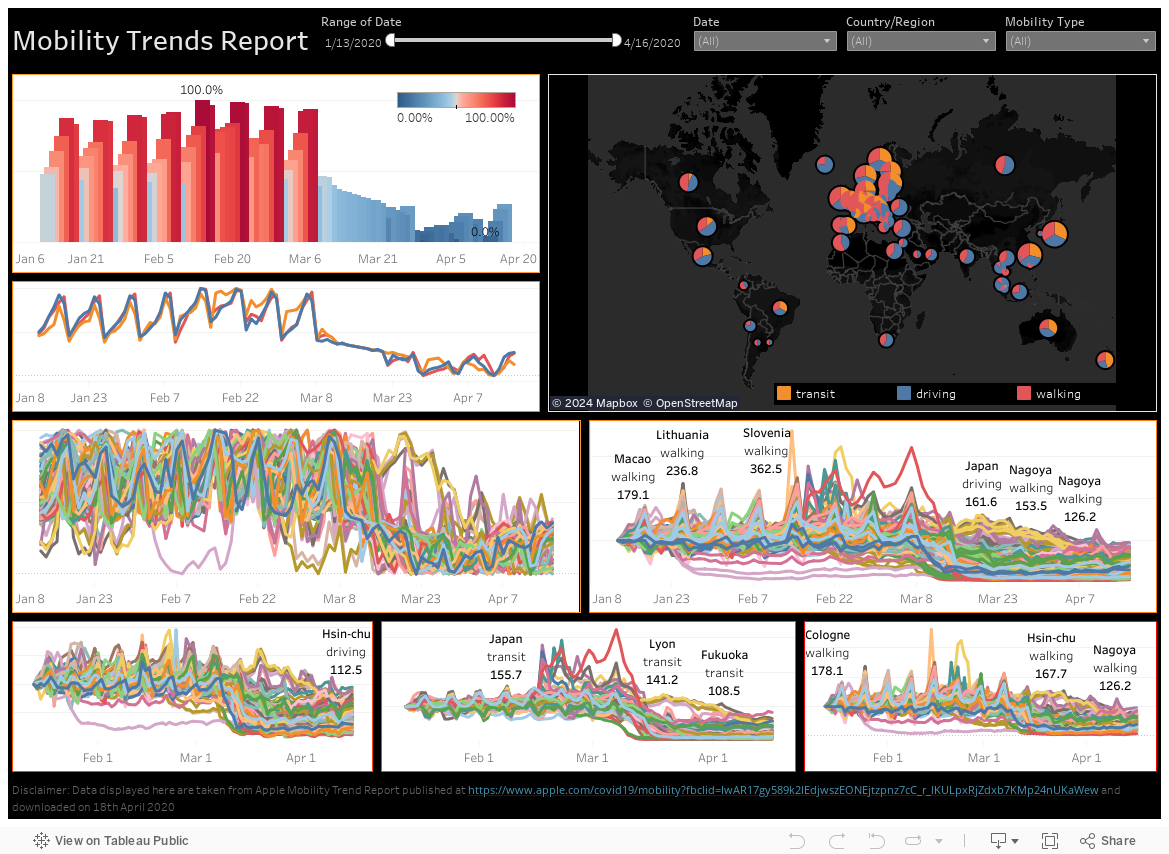
Mobility Data based on Apple's mobility data.
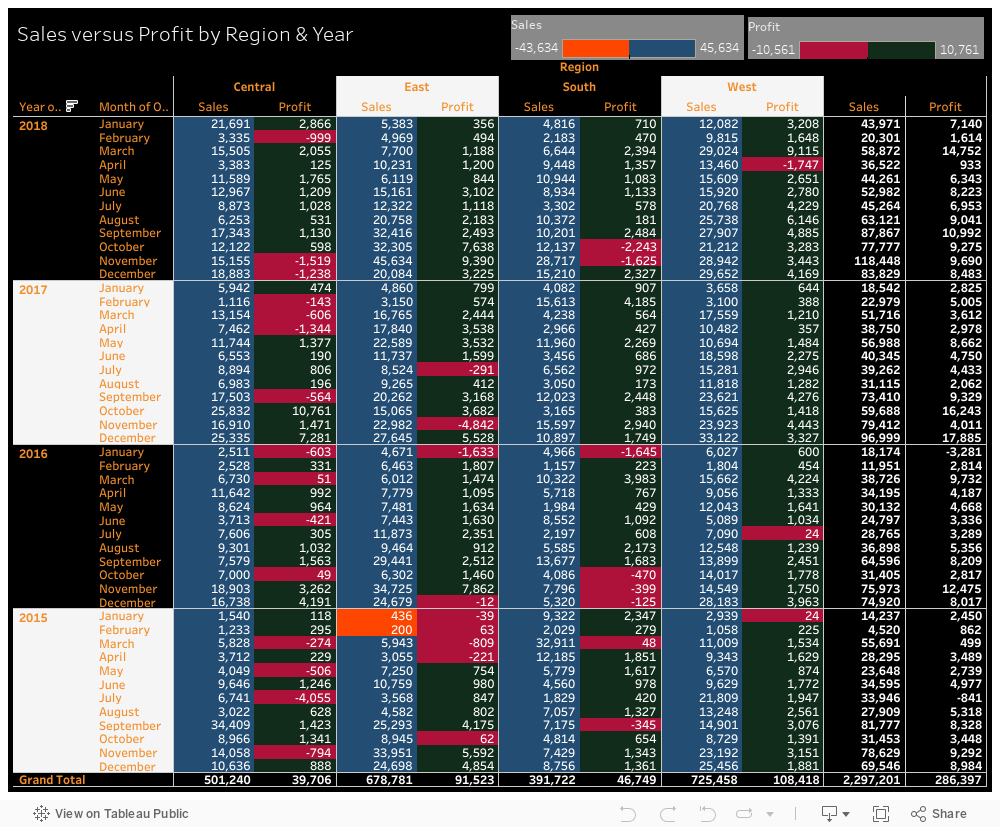


Grid on Dark Mode based on Tableau Sample Superstore (edited version)

All visual is available at https://public.tableau.com/profile/nurul.haszeli.ahmad#!/

All dataset is available at data.world @ https://data.world/haszeliahmad/data-analysis
Share:

Saturday, April 11, 2020

Parameter in Tableau - Using available Dimension with additional 'All' for all data

I am writing (and still writing as of this article) a manual to assist me in teaching Tableau. One of the sections is Parameter. There are many examples and guidance provided by Tableau.

You may read/view the following articles/videos for the guide on parameter.
  1. https://interworks.com/blog/interworks/2012/03/26/how-to-create-and-use-parameters-in-tableau
  2. https://help.tableau.com/current/pro/desktop/en-us/parameters_create.htm
  3. https://help.tableau.com/current/pro/desktop/en-us/changing-views-using-parameters.htm
  4. https://www.youtube.com/watch?v=CrfEJ24FWpQ
  5. https://www.youtube.com/watch?v=rJsaezoTVAE
  6. https://www.youtube.com/watch?v=opfVV1maNVw

The only problem I faced was to have an 'All' data if the user did not select any or wishes to see all data. None of them help. I tried using Action and Filters, yet it only shows based on selection and all show nothing.

That is until I found this solution.

IFNULL([FilterField],’Null’) = IF [Paramter] != ‘All’ THEN [Parameter] ELSE IFNULL([FilterField],’Null’) END
In a more readable, it will be like this

IFNULL([FilterField],’Null’) = (
     IF [Parameter] != ‘All’ THEN 
          [Parameter] 
     ELSE 
          IFNULL([FilterField],’Null’) 
     END
)

Step to:
  1. Create your parameter - In this case, you use any Dimension as the Parameter by choosing a List and choose the list by changing the Fixed section and click on Add Values From.
  2. Don't forget to add 'All' as one additional list
  3. Drag the Dimension that you used as the parameter from the Dimensions Card into Filters Card.
  4. In the Filter option, choose Condition and choose by Formula, and insert the above solution into the formula. 
  5. Don't forget to change the [FilterField] to the Dimension used for the filter and the [Parameter] to your created parameter. 
  6. Do ensure that 'All' is the same as your definition in the parameter (the character case and spelling is equal)
  7. And that shall do it. You are ready to go.


There are also an alternative solution to this and posted here: http://www.vizwiz.com/2012/09/tableau-tip-adding-all-filter-option-to.html
Share:

Wednesday, January 1, 2020

Tableau For Beginner

I'll be publishing an ebook on Visualizing using Tableau. To those interested, please PM ya. Here is the front page.


Share:

About Me

Somewhere, Selangor, Malaysia
An IT by profession, a beginner in photography

Labels

Blog Archive

Blogger templates