My experience on my daily works... helping others ease each other

Tuesday, December 25, 2018

NPM and Ionic failed to run - EACCES and EISDIR error

You create new project using ionic framework. And suddently it says that there are new update either ionic update or npm update. You run the npm -i g ionic or npm -i g npm.. and your nightmare starts. You have
WARN tar EISDIR: illegal operation on a directory, open '/usr/local/lib/node_modules/.staging/@ionic/discover-b2d9d3b9/dist'
WARN tar EISDIR: illegal operation on a directory, open '/usr/local/lib/node_modules/.staging/readable-stream-4416b49f/lib'
WARN tar EISDIR: illegal operation on a directory, open '/usr/local/lib/node_modules/.staging/diff-4b455008/lib/util'
WARN tar EISDIR: illegal operation on a directory, open '/usr/local/lib/node_modules/.staging/source-map-848434cb/lib'
WARN tar EISDIR: illegal operation on a directory, open '/usr/local/lib/node_modules/.staging/string_decoder-e05a13c4/lib'
WARN tar EISDIR: illegal operation on a directory, open '/usr/local/lib/node_modules/.staging/source-map-848434cb/dist'

WARN tar EISDIR: illegal operation on a directory, open '/usr/local/lib/node_modules/.staging/rxjs-db639a40/_esm2015/internal-compatibility'

and EACCES error popping out.

Then suddenly your ionic serve command failed.

Definitely you will try to:

  • Remove the installation
  • Reinstall ionic or npm
  • Clean the cache
  • and so on...

with or without administration privileges (sudo).

AND still you can't run the ionic serve command.

Be cool, I've spent few hours too to figure out that problem. And finally, I found the most reliable method.

Below is the steps taken directly from https://docs.npmjs.com/resolving-eacces-permissions-errors-when-installing-packages-globally
  1. Back up your computer.
  2. On the command line, in your home directory, create a directory for global installations:
     mkdir ~/.npm-global
    
  3. Configure npm to use the new directory path:
     npm config set prefix '~/.npm-global'
    
  4. In your preferred text editor, open or create a ~/.profile file and add this line:
     export PATH=~/.npm-global/bin:$PATH
    
  5. On the command line, update your system variables:
     source ~/.profile
    
  6. To test your new configuration, install a package globally without using sudo:
     npm install -g jshint
    
Instead of steps 2-4, you can use the corresponding ENV variable (e.g. if you don’t want to modify ~/.profile):
    NPM_CONFIG_PREFIX=~/.npm-global
and you shall be able to run your ionic serve command again.
Share:

Saturday, November 3, 2018

Big Data - we forgot to clean our data

Recently I have been working with lots of data coming from various business area such as maintenance, financial transaction, etc., and I found an interesting thought from much top management and young leaders whom don't have enough experience handling data from the source up till visualization.

The first thing comes out from their mind was can it be done in a few hours (or some of them thought it was in a blink of the eyes or in split seconds). Normal question was "When can we see the report or chart? Can we see it tomorrow" and the worst I get "I want it to be ready by today before noon".

Image result for unclean dataMy first reaction was WTF!! (but I won't say it loud). I will normally negotiate with them as most of them don't know the process and the data that they requested. Most of them are easily attracted/amazed by superb visualization presentation by Visualization Tool's Marketing team. The thought everything can be done easily as those marketing people said. They just forgot that in a business presentation, the data set used by those marketing people are prepared and cleaned before being utilized in the tool. For example, Tableau's presentation will always use Sales data for their sample.

It is true that many of visualization tools nowadays are capable to process and display any kind of data. With certain skills, you can massage and clean your data on the fly. I've done that and I know it can be done.  BUT... surely at a cost which from my perspective, it is no beneficial at all.

Why do I say so?


  1. You cannot guarantee that the data you read is 100% clean. You might need to do lots of conversions, data massaging, replacements and calculations. This will definitely incur additional processing power and time during report population. I've come across with many data which either irrelevant, unclean (character in a supposed to be numerical column, date define as string, etc), or contain null values.
  2. You may need to perform lots of table joint or union which can cause your report server or tool to be resource hungry.
  3. You need to understand the data too. Each column and how it shall be visualize must be understood before you can present it correctly.


Related image

That's all from me..Adios


Share:

Sunday, October 21, 2018

Lesson learn on R conference (ConfeRence 2018, ADAX Malaysia)

I attended R conferences organized @ ADAX Malaysia (ConfeRence) on October 20, 2018, recently. I do have an interest in AI, ML and Semantics Analysis. It started since 2008 when I further studies focusing on program analysis, specialized on static analysis on C overflow vulnerabilities.

There are key points which I would like to share based on the knowledge shared by local experts.

Ensemble Method

I'm quite new and just heard about this. The presenter shared that there are many methods but common are Bagging, Boosting and Stacking

Bagging


  1. Can produce a Discrete or Continuous Result
  2. Discrete (Classifications) - voting
  3. Continuous - regression -> mean
  4. Basically, the data is put into multiple "bags" in a random selection and you train the using one or various model. Finally, you find the mean of the result and produce the outcome from it.
For more understanding, check the video below


Boosting


  1. From the result, you will get a significant error and continue the training process on the data until you have no error on the latest bag or based on a defined number of the model required.
  2. 2 famous algorithm applied - GBM (Gradient Boosting Machine) & XGBoost - eXtreme Gradient Boosting Algorithm

To understand it, just check out the video below


Stacking (aka Ensemble Learners)


  1. In Stacking, you still use various model and numbers of bags.
  2. However, in stacking, you will use different algorithms such as KNN, LinReg, Decision Tree, SVM
  3. The result of the training on each bag which applied different algorithm will be added together to find the mean of it.


Other methods are also applicable such as Random Forest.

Ensemble method in R -> You can use SuperLearner Package library in R Studio

There are issues with ensemble which the data might be highly accurate when it is trained in development. But when you applied in the actual world, the data may produce a different result. To avoid this (inaccuracy or over-fitting problem), you will need to implement elastic net on all model. 2 known algorithms in elastic net are ridge and lasso.

Text Clustering with R


  1. Clustering in R can be calculated by using the algorithm like K-Means, KNN, Hierarchical Clustering, and DBScan.
  2. For Text Clustering, you need to measure the distance to enable you to cluster the text. For instance, what is the distance between the word 'wheel' and 'tire'. 
  3. Distance normally is measured using an algorithms known as Euclidean D
  4. For text clustering, there is a library that can be utilized to measure the distance; Wu-palmer developed by. However, the library only available for Python and not for R yet (as of the information shared on Oct 20, 2018)
  5. Available language lexical which can be used to measure distance using the algorithm is WordNet (https://wordnet.princeton.edu/)

Churn Prediction using SNA - Social Network Analysis

2 Library available and shall be used - igraph and R Markdown
Challenges in predicting - how to minimize loss due to algorithm implemented.

Some references:


  1. https://en.wikipedia.org/wiki/Ensemble_learning
  2. https://en.wikipedia.org/wiki/Cluster_analysis
  3. WordNet English (Lexical English Language) https://wordnet.princeton.edu/
  4. WordNet Bahasa Melayu (Lexical Malay Language) - http://wn-msa.sourceforge.net/index.eng.html
  5. https://en.wikipedia.org/wiki/Semantic_analysis_(linguistics)
  6. https://en.wikipedia.org/wiki/Latent_semantic_analysis
  7. https://blog.thedigitalgroup.com/words-similarityrelatedness-using-wupalmer-algorithm
  8. https://en.wikipedia.org/wiki/Euclidean_distance
  9. https://www.researchgate.net/publication/310572659_A_modification_of_Wu_and_Palmer_Semantic_Similarity_Measure


Thanks to the team who share their knowledge. Check it out them at https://www.facebook.com/groups/MalaysiaRUserGroup/

Share:

Thursday, September 27, 2018

Writing API using Native API

There are many tools/framework you can use without even need to write code such as strapi, LoopBack, Fusio, Api Umbrella, Kong, etc. If you need to develop it fast and run nginx or nodejs behind, utilizing and highly dependent on the available method and don't want to think or dirty your hand, then, either one of the above lists shall be sufficient.

However, if you need to run complex query upon request, despite all of the API framework/tool allowed you to perform that, but it does not guarantee great flexibility and stability when the framework/tool is updated.

There is a way to handle and overcome the limitation. I'm using native PHP to provide a complex query and processing API.

Feel free to check the code and try it out at github.
Share:

Wednesday, September 26, 2018

Managing multiple JDK in Mac OS

In MAC (Apple), it is a bit difficult to manage multiple Java Environment & JDK. If it is in windows, you may just change the home directory (JAVA_HOME) declaration in your system path. However, for Mac, you need to perform many steps and luckily there is a tool to help you out.

Check out the tool Jenv at http://www.jenv.be/ and steps is written here too.
Share:

Friday, August 31, 2018

Downloading and Formatting data for PDF output using Ionic, Angular, Cordova and TypeScript

It has been a while I did not focus and wrote anything on this blog and it is good to be back on track.

Lets kick start with writing PDF on your mobile apps. You may have data retrieve and your client require you to download the data as PDF. I've done that on Excel and it was way easy to do that.

Now lets start for PDF. It is pretty much easy too. We are going to use PDFMaker library.

If you follow the steps shows here, it shall be sufficient.

https://ionicacademy.com/create-pdf-files-ionic-pdfmake/

and you can read the entire library here

http://pdfmake.org/#/gettingstarted

You need to download and install three libraries for it to work
# Install Cordova Plugins
1. ionic cordova plugin add cordova-plugin-file-opener2
2. ionic cordova plugin add cordova-plugin-file

#Install NPM packages
3. npm install pdfmake @ionic-native/file-opener @ionic-native/file
Once complete, declare it in your apps.module.ts. The link above shall guide you with the sample.

The link above shows how it was done in a single page.  I, on the other hand, create a service provider to ease me in sharing the service between the apps. Below is the snapshot of my code... and Yup, I'm using Promise to ensure I can control the outcome and catch any error.

#the import
import { Platform } from 'ionic-angular';
//import { Http } from '@angular/http';
import { Injectable, Component } from '@angular/core';

import pdfMake from 'pdfmake/build/pdfmake';
import pdfFonts from 'pdfmake/build/vfs_fonts';
pdfMake.vfs = pdfFonts.pdfMake.vfs;

import { File } from '@ionic-native/file';
import { FileOpener } from '@ionic-native/file-opener';

#the control
createPdf( isMin: boolean ): Promise<any>{
return new Promise ((resolve,reject) => {
if( isMin ){
this.createPdfMin()
.then((data) => {
return resolve( data );
})
.catch( (error) => {
return reject( error );
})
} else {
this.createPdfMax()
.then((data) => {
return resolve( data );
})
.catch( (error) => {
return reject( error );
})
}
})
} //end createPdf

#partial code to create pdf
createPdfMin(): Promise<any>{
//let docDefinition = null;

return new Promise((resolve) => {
let docDefinition = {
// a string or { width: number, height: number }
pageSize: 'A4',

// by default we use portrait, you can change it to landscape if you wish
pageOrientation: 'potrait',

// [left, top, right, bottom] or [horizontal, vertical] or just a number for equal margins
pageMargins: [ 10, 30, 10, 30 ],

content: [
{ text: 'The Header', style: 'header' },
{ text: new Date().toTimeString(), alignment: 'right' },
//SPA Section
{ text: 'Sub Header', style: 'subheader' },

{ text: 'Sub Sub Header', style: 'subheader2' },
{
columns: [
{
text: 'Intial data'
},
{
width: '*',
text: theValue.toLocaleString('en-US', {
style: 'currency',
currency: 'MYR',
})
}
],
// optional space between columns
columnGap: 10
},
{ text: '---------------------------------------------------', style: 'subheader2' },
],
styles: {
header: {
fontSize: 18,
bold: true,
},
subheader: {
fontSize: 14,
bold: true,
margin: [0, 15, 0, 0]
},
subheader2: {
fontSize: 12,
bold: true,
margin: [0, 15, 0, 0]
},
story: {
italic: true,
alignment: 'center',
width: '50%',
}
}
}

this.pdfObj = pdfMake.createPdf(docDefinition);

return resolve( this.pdfObj );
});
} //end createPdfMin

#code to download the pdf
downloadPdf(pdfObj, type:string):Promise<any>{
console.log('fileCreator.downloadPdf()');
return new Promise((resolve) => {
if (this.plt.is('cordova')) {
pdfObj.getBuffer((buffer) => {
var blob = new Blob([buffer], { type: 'application/pdf' });
// Save the PDF to the data Directory of our App
this.file.writeFile(this.file.dataDirectory, 'file_' + type + '.pdf', blob, { replace: true }).then(fileEntry => {
// Open the PDf with the correct OS tools
this.fileOpener.open(this.file.dataDirectory + 'file_' + type + '.pdf', 'application/pdf');
})
});
} else {
// On a browser simply use download!
this.pdfObj.download();
}
return resolve("success");
})
} //end function downloadPdf

#how it is called from other page or file
this.fileCreatorProvider.createPdf(true)
.then((data) =>{
//download the file for min
this.fileCreatorProvider.downloadPdf(data,'type')
.then((data) => {
if ( data === 'success'){
this.presentAlert('Download Complete','Successfully download the file','success');
} else {
this.presentAlert('Download Error','Fail to download the file','error');
}
})
.catch((error) => {
this.presentAlert('Download Error','Fail to download the file. Catch ' + error,'error');
})
})
.catch((error) => {
this.presentAlert('Download Error','Fail to download the file. Catch ' + error,'error');
})


and you shall be ready.

By the way, it is just snapshot. It shall give you brief idea on how to do that.

Happy Coding!!!


Share:

Sunday, February 18, 2018

Save list as CSV in ionic (PWA)

Read/Write file into devices

Installation (https://ionicframework.com/docs/native/file/)

Install the Cordova and Ionic Native plugins:
$ ionic cordova plugin add cordova-plugin-file
$ npm install --save @ionic-native/file
Add this plugin to your app's module

There are few ways you can use to download the file, but I'm using the easiest way, that is implementing the download which I'm not pretty sure if it runs ok on Android and iOS.
I'm not writing directly into the device storage as there are many things to consider such as storage area, security, etc.

Few references:

  1. http://ngcordova.com/docs/plugins/file/
  2. https://www.npmjs.com/package/cordova-plugin-file
  3. https://github.com/apache/cordova-plugin-file
  4. https://github.com/jiahao1553/demo-ionic2-save-csv/blob/master/src/pages/home/home.ts
Share:

List of Data Sciences and Machine Learning usefull link

Credit to: Shivam Panchal
As published by Shivam at Linked @ https://www.linkedin.com/pulse/data-science-machine-learning-beginners-path-shivam-panchal/

Platforms:

  1. What Is Hadoop? Hadoop Tutorial For Beginners https://youtu.be/n3qnsVFNEIU
  2. What is Apache Spark? The big data analytics platform explained http://www.techworld.com.au/article/629920/what-apache-spark-big-data-analytics-platform-explained/
  3. Apache Spark Tutorial: ML with PySpark https://www.datacamp.com/community/tutorials/apache-spark-tutorial-machine-learning
  4. A Beginner's Guide To Apache Pig https://hortonworks.com/tutorial/beginners-guide-to-apache-pig/
  5. Realtime Event Processing in Hadoop with NiFi, Kafka and Storm https://hortonworks.com/tutorial/realtime-event-processing-in-hadoop-with-nifi-kafka-and-storm/

Math:

  1. A Deep Dive Into Linear Algebra https://www.khanacademy.org/math/linear-algebra
  2. An Introduction to Combinatorics & Graph Theory https://www.whitman.edu/mathematics/cgt_online/cgt.pdf

Tools & Framework:

  1. TensorFlow Tutorial – Deep Learning Using TensorFlow https://youtu.be/yX8KuPZCAMo
  2. A 6-part introduction to the MXNet API https://becominghuman.ai/an-introduction-to-the-mxnet-api-part-1-848febdcf8ab
  3. Keras Tutorial: The Ultimate Beginner's Guide to Deep Learning in Python https://elitedatascience.com/keras-tutorial-deep-learning-in-python

Data Visualization:

  1. Building Python Data Apps with Blaze and Bokeh https://youtu.be/1gD9LMqREDs
  2. Matplotlib Tutorial: Python Plotting https://www.datacamp.com/community/tutorials/matplotlib-tutorial-python
  3. Python Bokeh Tutorial - Creating Interactive Web Visualizations https://youtu.be/Mz1AXUE0nR4

Concepts:

  1. Simple Linear Regression https://onlinecourses.science.psu.edu/stat501/node/250
  2. Simple and Multiple Linear Regression in Python https://medium.com/towards-data-science/simple-and-multiple-linear-regression-in-python-c928425168f9
  3. Linear Regression in R https://www.tutorialspoint.com/r/r_linear_regression.htm
  4. An Introduction To Logistic Regression http://ufldl.stanford.edu/tutorial/supervised/LogisticRegression/
  5. Building A Logistic Regression in Python, Step by Step by Susan Li https://medium.com/towards-data-science/building-a-logistic-regression-in-python-step-by-step-becd4d56c9c8
  6. Supervised and Unsupervised Machine Learning Algorithms https://machinelearningmastery.com/supervised-and-unsupervised-machine-learning-algorithms/
  7. 6 Easy Steps to Learn Naive Bayes Algorithm (with codes in Python and R) https://www.analyticsvidhya.com/blog/2017/09/naive-bayes-explained/
  8. A Tutorial on Support Vector Machines for Pattern Recognition http://www.cs.northwestern.edu/~pardo/courses/eecs349/readings/support_vector_machines4.pdf
  9. A Complete Tutorial on Tree Based Modeling from Scratch (in R & Python) https://www.analyticsvidhya.com/blog/2016/04/complete-tutorial-tree-based-modeling-scratch-in-python/

Python:

  1. A Complete Tutorial to Learn Data Science with Python from Scratch https://www.analyticsvidhya.com/blog/2016/01/complete-tutorial-learn-data-science-python-scratch-2/
  2. NumPy Tutorial: Data analysis with Python https://www.dataquest.io/blog/numpy-tutorial-python/
  3. Scipy Tutorial: Vectors and Arrays (Linear Algebra) https://www.datacamp.com/community/tutorials/python-scipy-tutorial
  4. Python Pandas Tutorial https://www.tutorialspoint.com/python_pandas/
  5. Machine Learning with scikit learn Part 1 & 2 https://youtu.be/2kT6QOVSgSghttps://youtu.be/WLYzSas511I

CS:

  1. A Thorough Overview of Computational Logic https://www.cs.utexas.edu/users/boyer/acl.pdf

Game Theory:

  1. Game Theory - A 3 Part Introduction https://youtu.be/x8gOi7D6QeQ

Statistics:

  1. Correlation & causality https://www.khanacademy.org/math/probability/scatterplots-a1/creating-interpreting-scatterplots/v/correlation-and-causality
  2. Analysis of variance (ANOVA) https://www.khanacademy.org/math/statistics-probability/analysis-of-variance-anova-library
  3. Understanding Hypothesis Tests: Significance Levels (Alpha) and P values in Statistics https://shar.es/1PANrc
  4. Characteristics of Good Sample Surveys and Comparative Studies https://onlinecourses.science.psu.edu/stat100/node/3
  5. Descriptive and Inferential Statistics https://www.thoughtco.com/differences-in-descriptive-and-inferential-statistics-3126224
  6. Intro to Probability Theory https://youtu.be/f9XFM8YLccg
  7. Introduction to Conditional Probability & Bayes theorem for data science https://www.analyticsvidhya.com/blog/2017/03/conditional-probability-bayes-theorem/
  8. Central limit theorem https://www.khanacademy.org/math/statistics-probability/sampling-distributions-library/sample-means/v/central-limit-theorem
Share:

Wednesday, February 14, 2018

Synchronizing the Asynchronous - Controlling the flow in ascynchronous type of apps

You have certain process to run in sequence; for instance
1. Login into the system
2. Check if the user valid, user status is valid, user role is valid
3. Store for future references
4. Capture audit trail and set timing, menu etc
5. Finally, show correct page base on user role and preferences

This shall be ok in synchronize programming. However, for programming like javascript, js, etc., you may face issues such as null value on a certain process, invalid id, or pages, etc.

There is ways, 'easy' way, but there is no guarantee that the data you will be receiving is accurate or at the exact time you need it.

Example of easy way is using timeout, as shown below

setTimeout(() => {
resolve('success');
}, 100)


Yet, the above example may not resolve your issues entirely.

Another option that looks promising is using Promise. However, there is a drawback to it. Your program may continue waiting despite it is already completed. Although it is a promise, within promise is still asynchronous program run.

return new Promise( (resolve, reject) => {
if (user) {
console.log("getUserProfile() - Success getting user in "
+ JSON.stringify(user) );
resolve(user);
} else {
this.showError('Access Denied! Invalid User Access');
reject('Access Denied! Invalid User Access');
}
});

Take for example the above code. The console may run after resolve(user) as the JSON.stringify may take few seconds than just return resolve value.

So, what is the best solution. Actually, there are no better solutions. What I did was,
1. Rewrite the code and logic and ensure all setting was done prior to user validation and page movement.
2. You can use Reducer or Promise-Sequential

You may refer here:

  1. https://blog.risingstack.com/node-hero-async-programming-in-node-js/
  2. https://forum.ionicframework.com/t/how-can-i-use-promise/40469/3
  3. https://www.promisejs.org/
  4. https://javebratt.com/wtf-promise/
  5. http://coenraets.org/blog/2016/02/angular2-ionic2-data-services-promises-observables/https://stackoverflow.com/questions/47767654/ionic-3-typescript-promise


For me, I'm using the latter (with timeout) as the former implementation is a bit complicated compared to the latter.

Here how I resolve the problem:
var sequential = require('promise-sequential');
var array = [this.getUserProfile(),this.validateUser()];

sequential(array.map((item) => {
return function(previousResponse, responses, count) {
return new Promise(resolve => {
setTimeout(() => {
resolve('success');
}, 100)
})
}
}))
.then(res => {
this.doLogin()
})
.catch(err => {
console.log('loginWithPromise(): ' + err );
this.showError(err);
})

wallawei!!! Hope it helps :)
Share:

Thursday, February 1, 2018

Running javascript on typescript project (Ionic + Angular) - 'require' not found

Using javascript on Ionic + Angular project which is based on typescript may troublesome and causing you days to figure out. You can get many kind of error such as 'require' not found, 'typescripts' not available, 'no such library' etc.

However, there are ways to implement. You can follow the steps mentioned here. I'm trying to implement bcryptjs on my ionic project. You may have different javascript required. Nonetheless, the steps shall be similar.

First, take a look at https://x-team.com/blog/include-javascript-libraries-in-an-ionic-2-typescript-project/ and follow some of the step shown here.

Then, follow the step discussed at https://stackoverflow.com/questions/31173738/typescript-getting-error-ts2304-cannot-find-name-require

And you shall be successfully run script based on javascript on your Ionic + Angular Project.

Wallawei!!!!
Share:

Sunday, December 31, 2017

Javascript to newbies

Want to learn JavaScript and conquer the world? Start here:

Tutorials and Books
- JavaScript For Cats is a dead simply introduction for new programmers.
- MDN JavaScript Guide has the most standard and straightforward tutorials. If you need references, MDN is here for you
too.
- You Don’t Know JS is the best book to learn JavaScript from. It’s free to read on GitHub.
- Eloquent JavaScript is another great introduction to programming and learning JavaScript.
- Modern JavaScript Cheatsheet helps you understand and learn all the new features in the language.
- JSBooks, a collection of free JavaScript books.

Videos and Courses
- JavaScript: Understanding the Weird Parts an incredible course which teaches the concepts of the language. First 3 hours
are free on YouTube, you can but the whole course from Udemy.
- FunFunFunction makes the learning process enjoyable.
- Javascript30, 30 videos to level up your skills.
- Traversy Media great contents mostly aimed for begginers.

Learn by Doing
- FreeCodeCamp, learn to code by building projects.
- CodeAcademy, learn to code interactively.
- Codewars, train with programming challenges.

Functional Programming
This where the true the good parts show theirselves.
- JSUnconf 2016, learn functional programming basics with this talk from Anjana Vakil.
- FunFunFunction's videos are a great start.
- Mostly Adequate Guide to Functional Programming and Functional Light JS will make you master the functional programming.
- JavaScript Allongé, programming from functions to classes.
- Functional Programming Jargon in simple terms.
- awesome-fp-js is a good reference for functional programming in JavaScript.

Other Resources
- Spellbook of Modern Web Dev is a big picture of modern JavaScript development.
- What the fuck JavaScript?, list of funny and tricky JavaScript examples.

From JS telegram Part of @thedevs 
Rules: @thedevsrules Join other dev groups https://thedevs.network
Share:

Thursday, December 28, 2017

Cannot parse JSON-encoded object value

I'm using Loopback, a node.js API framework which helps you to develop RESTful API very easy and fast. It reduces the programming/coding require and allow you to deploy your API within days.

However, things may not be as easy you can think of. The documentation given is still lack of information and there are not many solutions that can help you to solve your problem. One of it is Cannot parse JSON-encoded object value issue.

The error message you will get as example below

error": {
"statusCode": 400
"name": "Error"
"message": "Cannot parse JSON-encoded object value."
"stack": "Error: Cannot parse JSON-encoded object value. at Object.fromSloppyValue (D:\Project\loopback\touchpoint\node_modules\strong-remoting\lib\types\object.js:34:19) at HttpContext.buildArgs (D:\Project\loopback\touchpoint\node_modules\strong-remoting\lib\http-context.js:193:22) at new HttpContext (D:\Project\loopback\touchpoint\node_modules\strong-remoting\lib\http-context.js:59:20) at restStaticMethodHandler (D:\Project\loopback\touchpoint\node_modules\strong-remoting\lib\rest-adapter.js:485:15) at Layer.handle [as handle_request] (D:\Project\loopback\touchpoint\node_modules\express\lib\router\layer.js:95:5) at next (D:\Project\loopback\touchpoint\node_modules\express\lib\router\route.js:137:13) at Route.dispatch (D:\Project\loopback\touchpoint\node_modules\express\lib\router\route.js:112:3) at Layer.handle [as handle_request] (D:\Project\loopback\touchpoint\node_modules\express\lib\router\layer.js:95:5) at D:\Project\loopback\touchpoint\node_modules\express\lib\router\index.js:281:22 at Function.process_params (D:\Project\loopback\touchpoint\node_modules\express\lib\router\index.js:335:12) at next (D:\Project\loopback\touchpoint\node_modules\express\lib\router\index.js:275:10) at Function.handle (D:\Project\loopback\touchpoint\node_modules\express\lib\router\index.js:174:3) at router (D:\Project\loopback\touchpoint\node_modules\express\lib\router\index.js:47:12) at Layer.handle [as handle_request] (D:\Project\loopback\touchpoint\node_modules\express\lib\router\layer.js:95:5) at trim_prefix (D:\Project\loopback\touchpoint\node_modules\express\lib\router\index.js:317:13) at D:\Project\loopback\touchpoint\node_modules\express\lib\router\index.js:284:7"

You can google it but the solution was not helpful enough to guide you. Sometimes, when you used its pre-default apps (coming together when you setup your loopback apps) known as swagger (Loopback API Explorer), the url and parameter used seem work as it meant to be. The problem only occurs when you try to call it from 3rd party apps such as ARC (Advanced Rest Client, POSTMAN, IMSONIA) or from your program, the above error occurs.

How to solve this?


  1. Ensure that you run and test your parameter passing which should be in JSON format is valid. You may use online such as Jsonlint or any JSON validator available.
  2. If it is valid, then, ensure that all key and value is in open and close double quote - "key": "value". Do not use single quote 'key': 'value'
  3. Finally, if the above two is correct, encode some of your parameter; for instance, '%' shall be encoded to '%25'. Use online encoder to help you such as https://www.urlencoder.org/


The above solution only applicable if you implement method through http GET, POST, PATCH, etc request. It may not be applicable for other REST calling method.

#enjoycoding


Share:

Wednesday, December 27, 2017

Set the display to center using Ionic

If you are developing apps focusing only on mobile, you may not be facing display issue as the user won't be able to see gaps or alignment problem. However, if you are developing apps that required to run on multiple platforms including web and mobile, aligning your display may cause a problem.

You will spend lots of time to configure your .css (or .scss) and when you thought you solved the problem on mobile, it shows differently on web.

I too faced such difficulties and finally found a way to solve it. I'm using ion-card and ion-list together.

here are snapshot of the code
<ion-card-content style="justify-content: center; margin-left: 0px; margin-right:
0px;background-color: #000000;">
<ion-card-title style="color: #fcfa87">
Center content <br> Working together
</ion-card-title>
<ion-list no-lines style="justify-content: center; margin-left: 0px;
margin-right: 0px; background-color: #030303;">
<ion-item style="background-color: #f1f7d6;">
<ion-label floating class="item item-input">Username</ion-label>
<ion-input type="text" name="username" class="input-label"></ion-input>
</ion-item>

and of course you need to configure your .scss too

snapshot of the code
.displayed {
display: block;
margin-left: auto;
margin-right: auto;
}
.card{
width:100%;
margin: auto;
}

the first (.displayed) shall be call by your ion-content tags and the .card is automatically set the card to be 100% width depending on your screen size

and it shall be displaying nicely on any screen as shown below
On web browser

On iPhone 7
For complete source code, you can download from my github.

All the best coding :)

Share:

Tuesday, October 31, 2017

Best Hacking e-books 2017

1.Metasploit The Penetration Tester's Guide 
https://www.up-4ever.com/591f0cz49n7d

2.A Beginners Guide To Hacking Computer Systems 
https://www.up-4ever.com/idwc4g1ag2ob

3.Black Book of Viruses and Hacking 
https://www.up-4ever.com/niv9ibml1voe

4.Hackers High School 13 Complete Hacking Ebooks 
https://www.up-4ever.com/82dzt2rjcpy3

5.Reverse Engineering Hacking and Cracking 
https://www.up-4ever.com/b2fgqs7cxw9a

6.Computer Hacking 
https://www.up-4ever.com/tuaz42q7dh0y

7.Blind SQL Injection Discovery & Exploitation 
https://www.up-4ever.com/83i3791x8gc5

8.Hacking With Experts  Facebook Hacking)Size:3mp 
https://www.up-4ever.com/ruph352nrxcl

9.Computer Hacking & Malware Attacks for Dummies 
https://www.up-4ever.com/xgcvoxuc6y76

10.stealing network 
https://www.up-4ever.com/96r86k3dg2yy

11.secrets of super hacker 
https://www.up-4ever.com/kifr8kytmfz9

12.501 websites secrets 
https://www.up-4ever.com/zqpne3e4s2cy

13.google dangerous searching 
https://www.up-4ever.com/en6dihqmf3lm

14.hacking gmail 
https://www.up-4ever.com/v2oxzy02sgm8

15.computer viruses 
https://www.up-4ever.com/gib7ecozp8yg

16.google apps hacks 
https://www.up-4ever.com/cxokzthwn6rh

17.gray hat hacking 
https://www.up-4ever.com/s5e7c3jif0kn

18.webapp hacker hand book 
https://www.up-4ever.com/85y1mqe8qgar

19.denial of service 
https://www.up-4ever.com/dfpwh6a3uw4y

20.Vulnerability Exploit & website Hacking for Dummies 
https://www.up-4ever.com/9hxraizlp8zq

21.Internet Advanced Denial of Service (DDOS) Attack 
https://www.up-4ever.com/gyf271w4gwbo

22.Beginning Ethical Hacking with Python.pdf       
http://gsurl.in/4Laz

23.Certified Ethical Hacker (CEH) Foundation Guide.pdf 
http://gsurl.in/4Lbj

24.Game Hacking.pdf
http://gsurl.in/4Lbt

25.Hacking Android.pdf 
http://gsurl.in/4LbB

The link listed above is valid as of 30th October 2017
Share:

Saturday, September 30, 2017

Developing Microservices Using Orleans by Microsoft


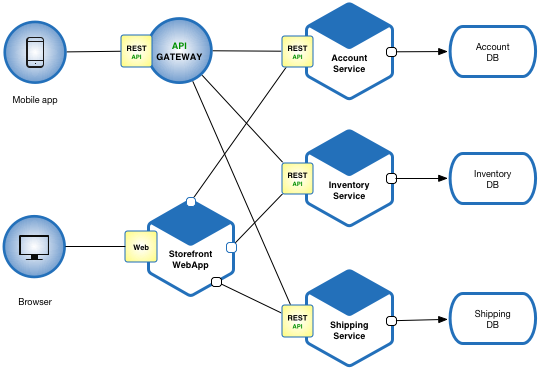
Image result for microservices architectureI am new to Microservices although it has been a while in software engineering world. Luckily Microsoft (am not marketing them) has done a pretty good job in explaining the detail.

Take a look if you guys which to understand in detail.

Microservices offer great benefits but also raise huge new challenges. Microservice architecture patterns are fundamental pillars when creating a microservice-based application. [more]

And as part of their initiative (and of course to boost their .NET platform), they too develop a framework to support the implementation of microservices. Have time to read here.

* note: all link is valid as of 1st October 2017


Share:

Tuesday, July 25, 2017

Replicate same question to different course in Moodle

How do I copy Moodle Quiz questions from one course to another?

In the Moodle section from which you would like to copy questions:
1. In the “Administration” block, click on “Export” in the “Question bank” menu.
2. Choose “Moodle XML format” and select the category you would like to copy from the “Export category” drop-down menu; click on the “Export questions to file” button.
3. Save the file to your desktop.
4. Go to the Moodle section to which you would like to copy the questions.
5. Click “Import” in the “Question bank” menu.
6. Choose “Moodle XML format,” and make sure the “Default” course level category is chosen for the “Import category” drop-down menu.
7. Click “Choose file…” to open the “File picker” window.
8. In the “File picker” window, click “Choose File” to browse and select your exported Moodle questions file, then click “Upload this file.”
9. Click “Import,” and you will see a preview of the imported questions.
10. Click “Continue” to proceed to the category containing the imported questions.
NOTE: At this point, you have only copied the quiz questions, and must still create a new quiz and load in the copied questions.

To add the copied questions into a new quiz:

1. Go to the home page of your Moodle course section and click “Turn editing on.”
2. Click the “Add an activity or resource” link in any section where you would like the link to your quiz to be displayed.
3. In the “Add an activity or resource” window, choose “Quiz” and click on the “Add” button.
4. Give your quiz a Name, Open and Close Dates, and set any other desired configurations.
5. Click on the “Save and display” button at the bottom of the page.
6. Click on the “Edit quiz” button; in the “Select a category” drop-down menu in the purple box on the right, select the (newly imported) question category.
7. Check the box to the left of the questions you would like to add to the quiz, or check the box at the top of the column to select all.
8. Click on the “Add to quiz” button.

The above content is copied directly from here:
https://delta.ncsu.edu/knowledgebase/how-do-i-copy-moodle-quiz-questions-from-one-course-to-another/
Share:

About Me

Somewhere, Selangor, Malaysia
An IT by profession, a beginner in photography

Labels

Blog Archive

Blogger templates